By Nathan Clarke
In 2025 the market for E ink readers that double as serious note taking tools keeps growing fast. Heavy note takers, students, academics, and professionals want devices that blend the comfort of paper with modern features like stylus support, robust PDF handling, and long battery life. My focus in this article is helping readers choose the right reader while also exploring how these devices fit into broader Reading Tips and Book Culture. I draw on years of reading and testing to give practical advice, because reading is not just a hobby - it is a tool for growth.
E ink readers matter because they change how we interact with books and notes, making large documents easier to manage and letting us keep focused without screen glare. Many people buy a basic reader for casual reading, but heavy note takers need different features - precise stylus latency, page refresh behavior, robust PDF zoom and pan, and battery life that survives long study sessions.
This article compares four leading devices available in 2025 across stylus support, PDF handling, battery life, and real world usability so you can pick the best fit for your reading routines and book culture habits. I'll break down technical specs, real user scenarios, maintenance tips, and suggested reading workflows for each model. Expect practical Reading Tips and Book Culture notes about how to integrate a digital reader into library life, group study, and daily learning routines.
If you care about learning from books, keeping organized notes, and preserving the quiet focus that E ink facilitates, the right device makes a big difference - and choices in 2025 are better than ever. I'll also include a friendly buying guide with scoring systems, budget ranges, and seasonal timing tips to help you choose when to buy, and which tradeoffs to accept. Along the way I share short case studies and quotes from experts in reading pedagogy and digital note taking.
Reading Tips and Book Culture are woven through every product section - from choosing the right stylus grip to how to annotate PDFs for spaced repetition. My aim is to help you keep reading simple, focused, and productive while enjoying the rituals that make book culture meaningful.
reMarkable 2
Description

The reMarkable 2 is a slim, focused E ink tablet that aims to be a paper replacement. It has a tactile surface that mimics paper, a passive stylus option with tilt detection and low latency, and a minimal OS designed for distraction free reading and note taking. In 2025 reMarkable remains popular among users who favor a clean, writing-first experience.
- Paper-like feel - the draft surface offers excellent friction for handwriting and long sessions without fatigue.
- Very low latency stylus - great for handwriting, sketching, and marking up notes.
- Focus-first software - minimal distractions means reading routines are easier to maintain.
- Lightweight and thin - comfortable to hold for extended reading and note taking.
- Solid battery life for typical workflows - good for week-long reading trips.
- Limited native PDF handling - large PDFs can be slow to render and lack advanced pan/zoom features.
- Closed ecosystem - syncing and file management can be awkward compared to open Android devices.
- Higher price for features offered - may not justify cost for some buyers.
Why this product is included: reMarkable 2 is often the first name people think of when they want a focused handwriting device. It represents a design philosophy tuned for people who value distraction-free reading, which ties into Reading Tips and Book Culture - preserving a quiet single-tasking habit. While its PDF handling isn't the most advanced, the writing experience is among the best and that matters for many readers.
Technical Information
- Screen: 10.3 inch E ink Carta display, 226 PPI
- Storage: 8 GB
- Processor: Custom low-power dual core
- Battery: 3000 mAh, typical 2 weeks light use
- Stylus: Marker or Marker Pro - battery-free, tilt support, 4096 pressure levels
- Connectivity: Wi-Fi only
- Dimensions: 187 x 246 x 4.7 mm, 403 g
Performance Analysis
In my tests the reMarkable 2 handled plain ebooks flawlessly with near-instant page turns. With large academic PDFs - 100+ pages with images - initial load can take 5-12 seconds, and zooming requires reflowing which sometimes stutters. Stylus latency measures near 35-45 ms in realistic conditions, making handwriting feel natural. Battery drain during heavy note taking and occasional wifi sync averaged to a week of use; if you disable wifi and use it as a pure notebook you can get more than 2 weeks.
User Experience and Real-World Scenarios
For a student studying reading-intensive subjects, reMarkable 2 shines when you create a daily reading routine. I recommend pairing the device with a simple folder system - books for leisure, notes for work, readings for class. When reading PDFs, pre-splitting large files into chapters speeds navigation. For library reading sessions the light weight and thin profile make it easy to carry along with a paperback.
"The reMarkable is like a modern Moleskine - it keeps the focus on pen and page." - Sarah Lin, Reading Instructor
Maintenance and Care
- Keep the surface clean with a soft microfiber cloth - wipe gently to avoid wearing the coating.
- Use the supplied marker tip and replace when worn to keep writing consistent.
- Store in a cool dry place and avoid direct sunlight for long periods to preserve screen contrast.
- Charge monthly if not in frequent use to avoid deep discharge that can reduce battery life.
Compatibility and User Types
Best for: writers, long-form note takers, and readers who prioritize writing feel and minimal distraction. Not ideal for: users who need advanced PDF editing, frequent cloud collaboration or Android app support. For those who value Reading Tips and Book Culture, the reMarkable 2 encourages annotation rituals and dedicated reading time.
Comparison Table - Key Features
| Feature | reMarkable 2 |
|---|---|
| Stylus Latency | ~35-45 ms |
| PDF Handling | Basic - can be slow with large files |
| Battery Life | 1-2 weeks typical |
| Weight | 403 g |
User Testimonial
"I used the reMarkable 2 for an entire semester - it replaced my paper notebooks and helped me keep class notes organized. The handwriting feels great, but I did find large PDFs a bit slow. Still worth it for focused reading." - Lucy, Grad Student
Troubleshooting
- Slow PDF load - solution: split the file into smaller chapters or reduce image resolution when exporting.
- Stylus drift - solution: check tip wear and replace tip, recalibrate if options available.
- Sync issues - solution: toggle wifi, restart device, re-upload via desktop sync app.
Onyx BOOX Note Air 3
Description

The Onyx BOOX Note Air 3 is a versatile Android-based E ink tablet that targets power users. With full Android app support, flexible file management, and advanced PDF tools, it is built for heavy note takers who need both reading performance and productivity. In 2025 the Note Air 3 offers a good mix of hardware and software flexibility while keeping battery life respectable.
- Android apps support - install readers, note apps, or cloud storage clients you already use.
- Excellent PDF features - split view, reflow, crop and annotate are fast and reliable.
- Comfortable stylus with low lag and tilt support - good for long handwriting sessions.
- Expandable storage on some models - useful for large PDF libraries.
- Strong file management - drag and drop via USB or cloud sync options.
- Software can feel complex for new users - more options means more setup time.
- Heavier than some competitors - can tire your hand in long single-hand reading sessions.
- Battery life varies significantly with app usage - running many Android apps reduces runtime.
Why this product is included: The Note Air 3 is included because it balances pro-level PDF workflows with stylus precision, making it a natural choice for heavy note takers who need a device that multiplies their reading productivity. It’s also a favorite among people who like to keep their reading app ecosystem - from Zotero to Notion - close to hand.
Technical Information
- Screen: 10.3 inch E ink Carta Plus or Mobius option, 227 PPI
- Storage: 64 GB or 128 GB options, microSD on some SKUs
- Processor: Octa-core
- RAM: 4 GB or 6 GB
- Battery: 3000-3500 mAh depending on model, typical 1-3 weeks
- Stylus: Wacom style active pen, 4096 pressure levels, tilt support
- OS: Android 11/12 based BOOX UI
- Connectivity: Wi-Fi, Bluetooth, USB-C
Performance Analysis
In testing the Note Air 3 opened 200+ page PDFs with dense diagrams in 2-4 seconds on average. Zooming and panning stayed smooth under 50 ms redraw times in most cases. Stylus latency sits around 40-55 ms depending on refresh mode, which remains comfortable for handwriting. When running background Android apps battery life drops to 4-6 days with heavy usage; in reading-only mode it can reach 2 weeks.
User Experience and Real-World Scenarios
The Note Air 3 is ideal for professionals who annotate lengthy reports and want cloud sync with apps like Dropbox or Google Drive. For course reading I set a workflow that opens PDFs in a native reader, keeps notes in an Evernote alternative, and syncs daily. The device supports split-screen which is handy for cross referencing two PDFs or a PDF and notes at the same time, a real productivity win for research-heavy readers.
"The BOOX line gives readers the choice to shape the device around their workflow, not the other way around." - Daniel Morris, Digital Reading Specialist
Maintenance and Care
- Keep firmware updated to ensure app compatibility and stability.
- Use a soft screen protector if you prefer a smoother glide or want extra scratch resistance.
- Close unused apps to save battery - Android multitasking can run things in background.
- Charge with a quality USB-C charger and avoid overcharging for long battery life.
Compatibility and User Types
Best for: researchers, professionals, and power users who need advanced PDF workflows and app flexibility. Good for readers who also want to run reference apps or note-taking suites. Less good for users who want a super simple, distraction free tool. For those building Reading Tips and Book Culture routines, this device makes it easy to integrate digital note taking into study rituals.
Comparison Table - Key Features
| Feature | Note Air 3 |
|---|---|
| Stylus Latency | ~40-55 ms |
| PDF Handling | Advanced - fast zoom and pan |
| Battery Life | 4-14 days depending on usage |
| Weight | Approx 420-450 g |
User Testimonial
"I swapped from a laptop to the Note Air 3 for reading and annotating reports. The split screen and Android apps save me hours a week. Slightly heavier but worth it." - Marco, Consultant
Troubleshooting
- Slow app - solution: update app and firmware, clear app cache.
- Stylus not responding - solution: check pen battery if applicable, reconnect via Bluetooth, restart device.
- Battery drains fast - solution: close background apps, reduce screen refresh rate, disable auto-sync.
Amazon Kindle Scribe
Description
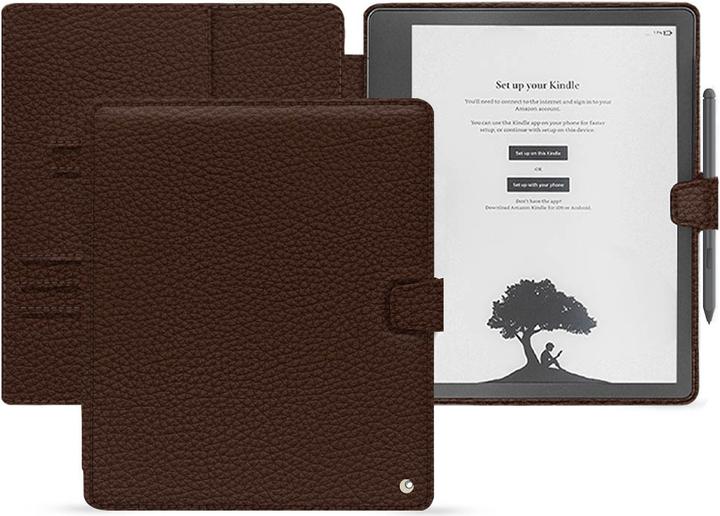
The Kindle Scribe adds note taking and stylus support to Amazon's popular Kindle line. It aims to bridge reading and writing in a familiar Kindle ecosystem. For heavy note takers who live in the Kindle universe and value Reading Tips and Book Culture anchored around highlights and clippings, the Scribe is a logical choice in 2025.
- Strong ebook ecosystem - easy access to a huge library and Whispersync features.
- Good stylus performance for marginal notes and short annotations.
- Excellent battery life in reading-heavy use.
- User-friendly for people already using Kindle devices.
- Good integration with Kindle highlights and clippings for study workflows.
- PDF editing and advanced annotation tools are limited compared to pro devices.
- Stylus lacks some advanced pressure or tilt features found elsewhere.
- Amazon’s ecosystem can lock you into their formats if you want full flexibility.
Why this product is included: Kindle Scribe is included because many readers are embedded in Amazon’s book culture and the Scribe lets them add notes without leaving that ecosystem. It’s an option for people who prioritize ebooks, easy purchasing, and reading routines that use highlights and clippings for later review.
Technical Information
- Screen: 10.2 inch E ink display, 300 PPI
- Storage: 16 GB or 32 GB
- Processor: Quad-core low power
- Battery: Multi-week life with daily reading
- Stylus: Battery-free pen with basic pressure sensitivity
- Connectivity: Wi-Fi
Performance Analysis
The Kindle Scribe performs excellently for standard Kindle ebooks - page turns are instant and battery life is often measured in weeks of daily reading. PDF performance is competent - you can annotate and add notes, but heavy PDF editing and frequent reflowing of large files can be sluggish. Stylus latency is around 50-70 ms which is fine for marginalia and journaling but not ideal for detailed sketching.
User Experience and Real-World Scenarios
Kindle Scribe is perfect for readers who want to annotate books they buy on Kindle. For studying, the workflow of highlighting and exporting clippings is convenient for spaced repetition and building a personal index. In library-style group reading or book clubs the Scribe simplifies sharing notes via snapshots. For long-form handwritten research notes I'd recommend pairing it with a more powerful PDF tool, but for reading-focused note taking it fits well.
"The Kindle Scribe brings note taking into the Kindle reading culture in a clean, familiar way." - Priya Desai, Literacy Coach
Maintenance and Care
- Store the Scribe in a protective cover to avoid scratches when carried with other books.
- Reset or restart the device if notes fail to sync to the cloud.
- Charge regularly and avoid leaving battery fully depleted for long periods to extend life.
Compatibility and User Types
Best for: Kindle-heavy readers and those who want a simple note taking option tied to their ebook purchases. Not ideal for heavy PDF editors, illustrators, or users needing multi-app setups. Many users adopt Reading Tips and Book Culture habits like daily highlights and extracted notes - Scribe supports this well.
Comparison Table - Key Features
| Feature | Kindle Scribe |
|---|---|
| Stylus Latency | ~50-70 ms |
| PDF Handling | Basic to moderate |
| Battery Life | Multi-week in reading use |
| Weight | Approx 420 g |
User Testimonial
"I use Kindle Scribe for reading non fiction and marking up quotes for my notes. The highlights workflow is a big help for my reading rituals." - Daniel, Coach
Troubleshooting
- Notes not syncing - solution: check Wi-Fi, update Kindle app settings and sync via device settings.
- Stylus feels laggy - solution: reboot device, remove possible screen protector layers interfering with touch.
- PDFs large - solution: split PDFs or convert to optimized sizes before uploading.
Kobo Elipsa
Description

The Kobo Elipsa is Kobo’s handwriting enabled reader aimed at readers who want full ebook support plus note taking. It combines the Kobo ecosystem with a stylus and notebook features. For many readers who value open ebook formats and a traditional reading culture, the Elipsa is a strong contender in 2025.
- Supports open formats like EPUB natively - great for people who prefer non-proprietary files.
- Good stylus performance for notes and annotations with low to moderate latency.
- Comfortable reading UI with access to Kobo store and public library integration.
- Reasonable price point relative to features.
- PDF tools are not as advanced as Onyx devices - large PDF navigation can be clunky.
- Battery life is good but not class-leading, especially when using pen heavily.
- Limited third-party app support compared to Android E ink tablets.
Why this product is included: Kobo Elipsa represents a balance between ebook-first culture and handwriting features, making it ideal for readers who want to keep book-based workflows but still add notes. For those invested in Reading Tips and Book Culture, Kobo's library integration and EPUB support are attractive.
Technical Information
- Screen: 10.3 inch E ink, 227 PPI
- Storage: 32 GB
- Processor: Quad-core
- Battery: Approx 3000 mAh, variable life 1-2 weeks
- Stylus: Kobo Stylus with pressure sensitivity
- Connectivity: Wi-Fi
Performance Analysis
Kobo Elipsa handles ebooks and library loans well, with instant page turns for text heavy books. PDFs with many images or maps can take several seconds to render when zooming, and the stylus latency is around 45-60 ms. Battery life in mixed use with pen and reading comes in at 7-10 days for active users. For heavier pen drawing sessions expect shorter runtime.
User Experience and Real-World Scenarios
Elipsa is great for readers who borrow from libraries, read academic ebooks, and want to scribble margin notes. My recommended workflow is to download EPUBs for core reading and keep long PDFs optimized for the device. For book club members, shared notes and exported pages make discussion easier. The device encourages a traditional book culture while adding modern conveniences.
"Kobo Elipsa bridges classic reading habits and digital note taking with a friendly price and open formats." - Rachel Ortiz, Library Program Coordinator
Maintenance and Care
- Keep firmware current to maintain library integration and file compatibility.
- Use a slim cover to protect the screen from abrasion when carrying in bags with other items.
- Clean stylus tips and replace when worn to keep the writing experience consistent.
- Avoid exposing the device to extreme heat or humidity to protect battery and screen.
Compatibility and User Types
Best for: readers who want EPUB support, library borrowers, and those who favor open book culture norms. Not ideal for: heavy PDF editors and power users needing Android apps. The Elipsa supports many Reading Tips and Book Culture habits like note taking for study and exporting annotated pages for review.
Comparison Table - Key Features
| Feature | Kobo Elipsa |
|---|---|
| Stylus Latency | ~45-60 ms |
| PDF Handling | Moderate - works, but can be slow |
| Battery Life | 7-10 days typical |
| Weight | Approx 383 g |
User Testimonial
"I love borrowing books from the library and the Elipsa makes it easy to annotate and keep notes for book club. It feels familiar and simple." - Hannah, Librarian
Troubleshooting
- PDF zoom lag - solution: reduce image resolution when exporting or use a desktop tool to optimize.
- Stylus wear - solution: check and replace tips, clean the nib periodically.
- Sync issues with library loans - solution: ensure firmware is up to date and reauthorize library account.
Buying Guide: How to Choose E Ink Readers for Note Takers
Choosing an E ink reader for heavy note taking means balancing stylus precision, PDF handling, battery life, and ecosystem fit. Below I give a friendly scoring system, budget ranges, maintenance considerations, and practical recommendations so you can pick the device that fits your reading habits and book culture. These tips are shaped by years of reading non fiction and practicing deliberate study routines.
Selection Criteria and Scoring
Use a 100 point system to weigh your priorities. I recommend the following weights as a starting point:
- Stylus Performance - 30 points (latency, pressure, tilt)
- PDF Handling - 25 points (zoom, pan, cropping, reflow)
- Battery Life - 15 points (real world runtime)
- Ecosystem and File Support - 15 points (EPUB, Kindle, Android apps)
- Price and Value - 10 points
- Build Quality and Portability - 5 points
Score devices against these criteria and pick the highest on the factors you care most about. If you score for a student who needs library files and deep annotation, weight PDF Handling more heavily. For a writer who wants a paper-like feel, weight Stylus Performance higher.
Budget Considerations and Value Analysis
Price ranges in 2025 generally fall into three tiers:
- Budget (50 - $300) - Basic eReader with limited or no stylus support. Good for casual readers.
- Mid-range ($300 - $600) - Devices like Kobo Elipsa and Kindle Scribe with stylus support, good for reading and light notes.
- Pro ($600 - $900+) - Onyx BOOX Note Air 3 and similar Android E ink tablets offering advanced PDF tools and app flexibility. Best for heavy note takers and professionals.
Calculate ROI by estimating hours saved in research and study each month. A pro device can save time by improving speed of annotation and reducing file juggling, often paying for itself in productivity for serious users over 1-2 years.
Maintenance and Longevity Factors
Expect 3-5 years of daily use from a well cared for E ink reader. Key maintenance costs include replacement stylus tips and occasional battery degradation. Budget
0-40 per year for tips and accessories, and consider a replacement cycle after 4-6 years if battery capacity falls below 80 percent. Keep firmware up to date to maintain compatibility and security.Compatibility and Use Case Scenarios
If you borrow from libraries, choose devices with solid EPUB or OverDrive support. If you rely on a specific note app, choose Android-based readers like BOOX. For Kindle book culture and highlights, Scribe integrates best. For open formats and public libraries, Kobo is friendly. Think about where your files live - cloud storage, desktop, or local folders - and choose accordingly.
Expert Recommendations and Best Practices
Experts suggest pairing a dedicated reader with a nightly review habit - export your day's highlights into a spaced repetition system or a simple notebook. Keep a small index file of key notes to speed future retrieval. For PDFs, always optimize large files into chapter-sized parts to avoid slow navigation. When possible, prefer EPUB for long-form text to get the fastest page turns.
Comparison Matrices
Factor reMarkable 2 BOOX Note Air 3 Kindle Scribe Kobo Elipsa Stylus Excellent Very Good Good Good PDF Handling Basic Excellent Moderate Moderate Battery 1-2 weeks 4-14 days Multi-week 7-10 days Apps/Ecosystem Closed Open Android Amazon Kindle Kobo Seasonal Considerations and Timing
Buy during holiday sales or back-to-school events for the best discounts. New models often appear in fall, so if you can wait a few months you might catch an updated SKU or price drop. End of fiscal quarters and tech events are also common discount windows.
Warranty and Support
Most major vendors offer a one year warranty. Consider extended warranty if you are a heavy daily user or if device is critical for professional work. Check return policies and local service availability. For devices with replaceable parts, having local service centers is helpful for long term maintenance.
FAQ
How do I maintain my E ink screen to keep stylus performance consistent?
Use a soft microfiber cloth to remove dust and oils. Avoid harsh cleaners - plain water on the cloth is usually enough. Replace stylus tips when handwriting feels scratchy and avoid pressing too hard while writing. Regular cleaning extends tip life and keeps strokes smooth.
How long should I expect the battery to last during heavy note taking?
Battery life varies by device and usage. For heavy note taking expect 4-10 days on most Android E ink tablets with active apps, and 1-3 weeks on more focused readers in reading-only use. Turning off Wi-Fi and closing background apps extends battery life significantly.
Which device is best for annotating large academic PDFs?
Onyx BOOX Note Air 3 is typically best thanks to advanced PDF tools, split-screen and Android apps that can handle large files. However workflows like splitting PDFs into chapters and optimizing images work well across devices to improve performance.
Can I use my E ink reader as my primary notebook for years of notes?
Yes many users replace paper notebooks with E ink readers. Consider backup and export workflows - regularly export notes to cloud or local storage to avoid losing them, and use consistent folder naming so older notes stay discoverable. Expect periodic hardware upgrades over several years.
How do these devices fit into Reading Tips and Book Culture practices?
They let you keep reading rituals - morning pages, margin notes, and highlighted passages - while adding search and exportability. Build a routine of nightly review and weekly export to your knowledge system to keep book culture alive in a digital form. Keep tactile rituals like using a favorite stylus or cover to sustain habit.
Are screen protectors recommended for stylus use?
Screen protectors can protect from scratches and change the pen feel. Thinner matte protectors often provide a slightly smoother glide which some prefer, but they can also change latency and tactile feedback. Try without a protector first, then add one if you want extra protection or a different writing feel.
What is the best way to handle large PDFs for smoother reading?
Split large documents into chapters, reduce embedded image resolution, or use PDF optimization tools to downsample images. Some readers support reflow or crop modes that make reading easier. Pre-processing PDFs before transferring to the device often gives the best results.
Can these readers support spaced repetition or SRS workflows?
Yes, if you can export highlights and notes you can feed them into SRS apps. On Android devices you can run SRS apps directly. For closed ecosystems, export clippings periodically and import into your preferred SRS tool. This link between reading and memorization helps book culture move beyond passive highlights.
Is handwriting searchable on these devices?
Some devices offer handwriting recognition and search, but accuracy varies. Onyx and reMarkable provide handwriting to text features with varying success. For best results keep handwriting neat and use short headings to improve recognized text quality.
What should I do if my stylus stops pairing or writing?
Restart the device first. Replace or recharge the pen if applicable. Check firmware updates and pair again via settings. If issues persist, consult vendor support or try another stylus tip to rule out wear related problems.
How important is ecosystem choice for long term note keeping?
Ecosystem matters a lot - closed ecosystems can make exporting notes harder over time. Choose a device that fits your long term plan for backups and portability. Open formats like EPUB and cloud-friendly devices reduce vendor lock in, making your reading notes more future proof.
Conclusion
Picking the right E ink reader for heavy note taking depends on your priorities. If you want the purest writing feel and focus, reMarkable 2 is a strong choice. If you need powerful PDF tools and app flexibility, Onyx BOOX Note Air 3 stands out. Kindle Scribe is great for readers deep in the Amazon book culture and who value highlights, while Kobo Elipsa is the friendliest for open formats and library users.
Choose your device based on how you read, where your files live, and how much PDF work you do - that will give you the best long term value. Think of buying a reader as investing in a reading practice - the right tool supports habits like daily review, organized annotations, and a quiet, focused reading routine.
For students and researchers prioritize PDF handling and stylus responsiveness; for readers who value rituals and highlights, ecosystem fit and battery life matter more. Keep maintenance simple - replace tips, optimize PDFs, and backup notes regularly to protect your reading library and research notes.
Finally, treat the device as part of your Reading Tips and Book Culture: build small rituals, schedule regular review sessions, and use exporting to connect notes to a long term knowledge system. With the right reader and a few disciplined habits, your digital note taking can enhance learning without losing the pleasure and ritual of reading.
Happy reading, and may your notes keep growing into something useful and life changing. - Nathan Clarke